케라스 기반으로 만들어진 비전 트랜스포머를 실행하고 코드를 공부해보자.
케라스 공식 홈페이지는 아래 링크에서 확인하면 된다.
https://keras.io/examples/vision/image_classification_with_vision_transformer/
Keras documentation: Image classification with Vision Transformer
► Code examples / Computer Vision / Image classification with Vision Transformer Image classification with Vision Transformer Author: Khalid Salama Date created: 2021/01/18 Last modified: 2021/01/18 Description: Implementing the Vision Transformer (ViT)
keras.io
이번 코드는 논문 이해를 돕기 위한 간단한 예시 정도로,
attention이 이미 라이브러리로 불러올 수 있도록 되어 있어서 직접 구현하는건 따로 해봐야 될 듯 하다.
import os

os.environ["KERAS_BACKEND"] = "jax"  # @param ["tensorflow", "jax", "torch"]

import keras
from keras import layers
from keras import ops

import numpy as np
import matplotlib.pyplot as plt
필요 라이브러리를 불러오고 백엔드 설정을 미리 한다.
num_classes = 100
input_shape = (32, 32, 3)

(x_train, y_train), (x_test, y_test) = keras.datasets.cifar100.load_data()

print(f"x_train shape: {x_train.shape} - y_train shape: {y_train.shape}")
print(f"x_test shape: {x_test.shape} - y_test shape: {y_test.shape}")
cifar100 데이터셋을 사용함으로 넘클래스는 100으로 설정한다.
각 이미지는 32x32 크기이고, RGB 3채널로 되어 있다 → (32,32,3)
케라스에서 제공되는 데이터셋을 이미지와 레이블을 구분하여 불러온다.
훈련 데이터(x_train)와 레이블(y_train)의 형태를 출력하여 shape을 확인한다.
케스트 데이터도 마찬가지로 shape 확인!
learning_rate = 0.001
weight_decay = 0.0001
batch_size = 256
num_epochs = 10  # For real training, use num_epochs=100. 10 is a test value
image_size = 72  # We'll resize input images to this size
patch_size = 6  # Size of the patches to be extract from the input images
num_patches = (image_size // patch_size) ** 2
learning rate, weight decay, batch size, epoch를 설정한다.
num_patches는 이미지에서 추출되는 패치의 수를 계산한다.
패치는 겹치지 않고 추출되기 때문에 패치사이즈에서 이미지 픽셀 수를 나눠주면 된다.
projection_dim = 64
num_heads = 4
선형 투영의 차원과 헤드 수를 설정한다.
transformer_units = [
    projection_dim * 2,
    projection_dim,
]  # Size of the transformer layers
FFN(Feed-forward Neural Network)의 유닛(노드)를 정한다.
첫 번째 레이어는 차원을 확장해서 풍부한 정보를 얻고,
두 번째 레이어에서 다시 차원을 축소하여 중요한 정보를 유지한다.
transformer_layers = 8
mlp_head_units = [
    2048,
    1024,
]  # Size of the dense layers of the final classifier
레이어는 8개로 설정하고 레이어 통과 후 적용되는 MLP(Multi-Layer Perceptron)의 유닛 수를 정한다.
2048개, 다음 레이어에서 1024 피처를 생성한다.
data_augmentation = keras.Sequential(
    [
        layers.Normalization(),
        layers.Resizing(image_size, image_size),
        layers.RandomFlip("horizontal"),
        layers.RandomRotation(factor=0.02),
        layers.RandomZoom(height_factor=0.2, width_factor=0.2),
    ],
    name="data_augmentation",
)
# Compute the mean and the variance of the training data for normalization.
data_augmentation.layers[0].adapt(x_train)
데이터 어그멘테이션을 한다.
정규화, 리사이징, 수평으로 뒤집기, 무작위 회전, 무작위 줌을 적용한다.
data_augmentation.layers[0].adapt(x_train)는 훈련 데이터를 사용해 Normalization 레이어가 평균과 분산을 미리 학습하여 이후 데이터의 정규화 과정을 수행할 준비를 하는 단계다.
즉, 데이터 픽셀 값에 맞춰서 평균과 분산을 구하고 적절한 값으로 정규화한다.
def mlp(x, hidden_units, dropout_rate):
    for units in hidden_units:
        x = layers.Dense(units, activation=keras.activations.gelu)(x)
        x = layers.Dropout(dropout_rate)(x)
    return x
다음은 MLP를 구현하는 과정이다.
x: 입력데이터
hidden_units: dense layer에 사용할 유닛 수
dropout_rate: 드롭아웃 비율
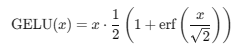
비전 트랜스포머는 GELU 활성화 함수를 사용한다.
겔루 함수는 렐루 함수 처럼 음수는 곧 0. 양수는 1로 극단적이지 않고 부드럽게 적용된다는 특징이 있다.

class Patches(layers.Layer):
    def __init__(self, patch_size):
        super().__init__()
        self.patch_size = patch_size

    def call(self, images):
        input_shape = ops.shape(images)
        batch_size = input_shape[0]
        height = input_shape[1]
        width = input_shape[2]
        channels = input_shape[3]
        num_patches_h = height // self.patch_size
        num_patches_w = width // self.patch_size
        patches = keras.ops.image.extract_patches(images, size=self.patch_size)
        patches = ops.reshape(
            patches,
            (
                batch_size,
                num_patches_h * num_patches_w,
                self.patch_size * self.patch_size * channels,
            ),
        )
        return patches

    def get_config(self):
        config = super().get_config()
        config.update({"patch_size": self.patch_size})
        return config
이제 입력 이미지에서 패치를 추출하는 함수를 구현한다.
설정한 패지 사이즈 크기 만큼으로 이미지를 분할하고 각 패치를 평탄화하여 변환한다.
[batch_size, height, width, channel] 이러한 형태로 입력으로 이미지가 들어오게 된다.
num_patches_h = height // self.patch_size
num_patches_w = width // self.patch_size
이미지를 패치 사이즈에 맞게 나누어 생성되는 패치의 수를 계산한다.
예를 들어 이미지 사이즈가 4x4이고 패치 사이즈를 2x2로 설정했다면,
이미지 높이/패치사이즈 = 4/2 = 2
이미지 너비/패치사이즈 = 4/2 = 2
2*2=4 총 4개의 패치가 나오게 된다.
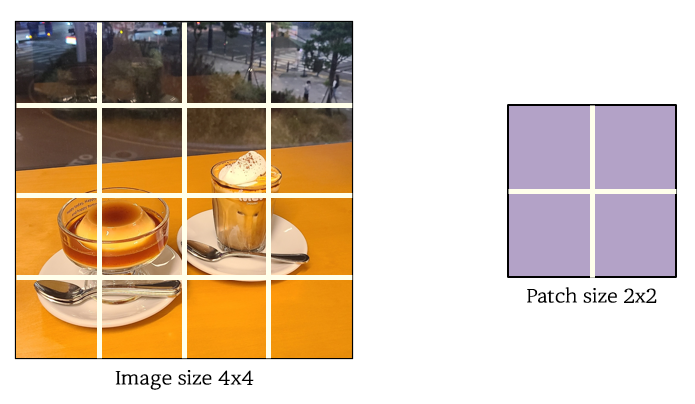

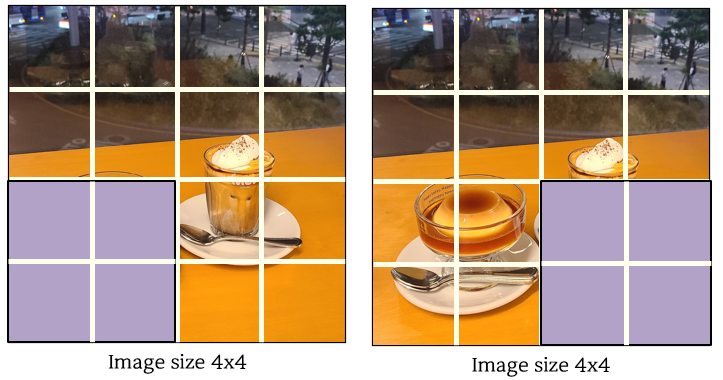
image.extract_patches 함수를 사용해 패치로 분할한다.
분할 후에는 각 패치를 평탄화 한다.
(batch_size, num_patches, flattened_patch_size)
배치 사이즈는 잠시 생략하고 (num_patches, flattened_patch_size) 형태를 입력 행렬이라고 하자.
여기까지 코드가 패치를 분할하고 평탄화 시키는 작업이다.
flattened_patch_size = 2x2x3 = 12
예시 이미지에서 입력행렬은 (4,12)가 될 것이다.
plt.figure(figsize=(4, 4))
image = x_train[np.random.choice(range(x_train.shape[0]))]
plt.imshow(image.astype("uint8"))
plt.axis("off")

resized_image = ops.image.resize(
    ops.convert_to_tensor([image]), size=(image_size, image_size)
)
patches = Patches(patch_size)(resized_image)
print(f"Image size: {image_size} X {image_size}")
print(f"Patch size: {patch_size} X {patch_size}")
print(f"Patches per image: {patches.shape[1]}")
print(f"Elements per patch: {patches.shape[-1]}")

n = int(np.sqrt(patches.shape[1]))
plt.figure(figsize=(4, 4))
for i, patch in enumerate(patches[0]):
    ax = plt.subplot(n, n, i + 1)
    patch_img = ops.reshape(patch, (patch_size, patch_size, 3))
    plt.imshow(ops.convert_to_numpy(patch_img).astype("uint8"))
    plt.axis("off")
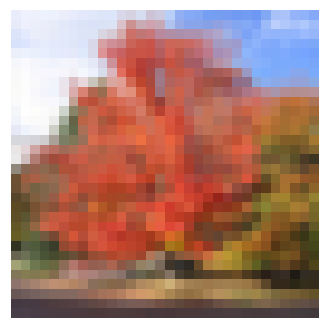
x_train에서 랜덤한 이미지를 선택하여 4x4 크기의 플롯에 표시하고, 이미지를 이전에 설정했던 패치 사이즈로 나눈다.
패치 분할 수, 패치 크기, 총 개수를 출력하여 확인한다.

패치의 총 개수에 맞추어 nxn 그리드를 생성하고, 각 패치를 원래의 2차원 형태로 reshape한 후, 개별적으로 시각화한다.
원래 이미지를 학습 시킬 때 리사이징한 크기로 맞추어서 출력한다.
아래 이미지가 코드 실행 후 출력된 결과이다.

class PatchEncoder(layers.Layer):
    def __init__(self, num_patches, projection_dim):
        super().__init__()
        self.num_patches = num_patches
        self.projection = layers.Dense(units=projection_dim)
        self.position_embedding = layers.Embedding(
            input_dim=num_patches, output_dim=projection_dim
        )

    def call(self, patch):
        positions = ops.expand_dims(
            ops.arange(start=0, stop=self.num_patches, step=1), axis=0
        )
        projected_patches = self.projection(patch)
        encoded = projected_patches + self.position_embedding(positions)
        return encoded

    def get_config(self):
        config = super().get_config()
        config.update({"num_patches": self.num_patches})
        return config
이전까지 인코더에 적용할 수 있도록 작업을 해주었다.
이제 패치를 받아 Linear Projection을 하고 Positional Embedding을 추가하는 레이어를 구현하는 부분이다.
패치의 위치 정보를 포함하는 임베딩 레이어로 패치의 위치를 임베딩 벡터로 변환하여 각 패치의 위치 정보를 더한다.
positions는 패치 수 만큼 위치 인덱스를 생성한다.
get_config 함를 통해 모델을 저장하고 나중에 불러올 때 레이어의 설정값을 저장한다.
def create_vit_classifier():
    inputs = keras.Input(shape=input_shape)
    # Augment data.
    augmented = data_augmentation(inputs)
    # Create patches.
    patches = Patches(patch_size)(augmented)
    # Encode patches.
    encoded_patches = PatchEncoder(num_patches, projection_dim)(patches)

    # Create multiple layers of the Transformer block.
    for _ in range(transformer_layers):
        # Layer normalization 1.
        x1 = layers.LayerNormalization(epsilon=1e-6)(encoded_patches)
        # Create a multi-head attention layer.
        attention_output = layers.MultiHeadAttention(
            num_heads=num_heads, key_dim=projection_dim, dropout=0.1
        )(x1, x1)
        # Skip connection 1.
        x2 = layers.Add()([attention_output, encoded_patches])
        # Layer normalization 2.
        x3 = layers.LayerNormalization(epsilon=1e-6)(x2)
        # MLP.
        x3 = mlp(x3, hidden_units=transformer_units, dropout_rate=0.1)
        # Skip connection 2.
        encoded_patches = layers.Add()([x3, x2])

    # Create a [batch_size, projection_dim] tensor.
    representation = layers.LayerNormalization(epsilon=1e-6)(encoded_patches)
    representation = layers.Flatten()(representation)
    representation = layers.Dropout(0.5)(representation)
    # Add MLP.
    features = mlp(representation, hidden_units=mlp_head_units, dropout_rate=0.5)
    # Classify outputs.
    logits = layers.Dense(num_classes)(features)
    # Create the Keras model.
    model = keras.Model(inputs=inputs, outputs=logits)
    return model
ViT 모델을 구현하는 함수다. 함수를 블록만큼 반복하며 패치 간의 관계를 학습하고 최종적으로 분류를 수행한다.
def run_experiment(model):
    optimizer = keras.optimizers.AdamW(
        learning_rate=learning_rate, weight_decay=weight_decay
    )

    model.compile(
        optimizer=optimizer,
        loss=keras.losses.SparseCategoricalCrossentropy(from_logits=True),
        metrics=[
            keras.metrics.SparseCategoricalAccuracy(name="accuracy"),
            keras.metrics.SparseTopKCategoricalAccuracy(5, name="top-5-accuracy"),
        ],
    )

    checkpoint_filepath = "/tmp/checkpoint.weights.h5"
    checkpoint_callback = keras.callbacks.ModelCheckpoint(
        checkpoint_filepath,
        monitor="val_accuracy",
        save_best_only=True,
        save_weights_only=True,
    )

    history = model.fit(
        x=x_train,
        y=y_train,
        batch_size=batch_size,
        epochs=num_epochs,
        validation_split=0.1,
        callbacks=[checkpoint_callback],
    )

    model.load_weights(checkpoint_filepath)
    _, accuracy, top_5_accuracy = model.evaluate(x_test, y_test)
    print(f"Test accuracy: {round(accuracy * 100, 2)}%")
    print(f"Test top 5 accuracy: {round(top_5_accuracy * 100, 2)}%")

    return history


vit_classifier = create_vit_classifier()
history = run_experiment(vit_classifier)


def plot_history(item):
    plt.plot(history.history[item], label=item)
    plt.plot(history.history["val_" + item], label="val_" + item)
    plt.xlabel("Epochs")
    plt.ylabel(item)
    plt.title("Train and Validation {} Over Epochs".format(item), fontsize=14)
    plt.legend()
    plt.grid()
    plt.show()


plot_history("loss")
plot_history("top-5-accuracy")
마지막으로 top-5와 loss를 시각화하는 코드다.
ViT 논문에서 옵티마이저를 Adam으로 했는데 여기서는 AdamW를 사용했다.
코드 실행 후 그래프 결과이다.
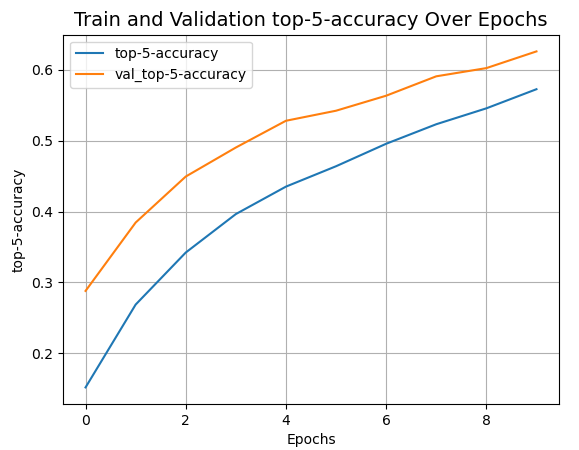
근데 loss 그래프.. 어디갔어? 실종되어서 다시 확인이 필요하다........